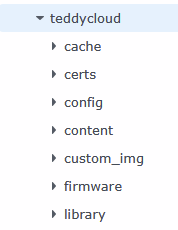
Unfortunately, Docker is no longer working in my LXC environment. I have backed up the Docker installation folders. How can I restore my data from the cloud in the LXC version?
Your TeddyCloud instance, which was hosted in a container is not working any more.
I think the easiest way is to set up a new instance from scratch and then to restore your data.
Once you have running a new TeddyCloud instance, you have to
- Copy the ‘certificates’ from your backup folder to the new instance certificate folder (‘certs’ folder)
- Copy the ‘config’ folder from your backup folder
- Copy the ‘custom_img’ folder from your backup folder
- Copy the ‘library’ folder from your backup folder.
I’ve never tested it, but I assume it could work.