Problems getting cc3200 running with TC and pihole

Hello,

this sounds like my problem. Could you please be so kind and give me some advice?

I made a fresh install of docker, portainer, and teddycloud on a newly RPi 5, 2GB.

I have a CC3200 that had the “low hack” before. I extended the SD card slot, to reach the sd card easily and used teddybench to create custom tags. Because of that, the tonie box was never in my WLAN, only at my smartphone hotspot.

And here the problems began :wink:

I noticed that after step 5 of the tutorial in the teddy cloud for adding new cc3200 boxes. Damn it, the tonie box is not in the same WLAN… I tried to change the password with the AP mode of the box, that helped for a moment, but the box forgot this, everytime it went to sleep.

So i changed ofw2 to ofw1, and entered the WLAN information on the TonieBox-Homepage. That worked! I changed back to ofw2. I now find the toniebox in my WLAN and teddycloud (named “tc” in the fritz.box) is in the same network range 192.168.178.X.

But when i do the freshness check, I get codeword ant. And the toniebox will not be found by the teddycloud.

Problem 1, DNS routing

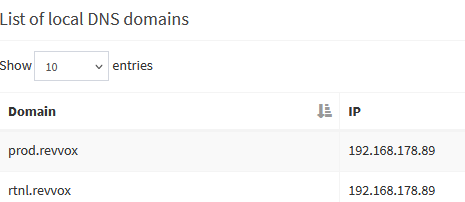
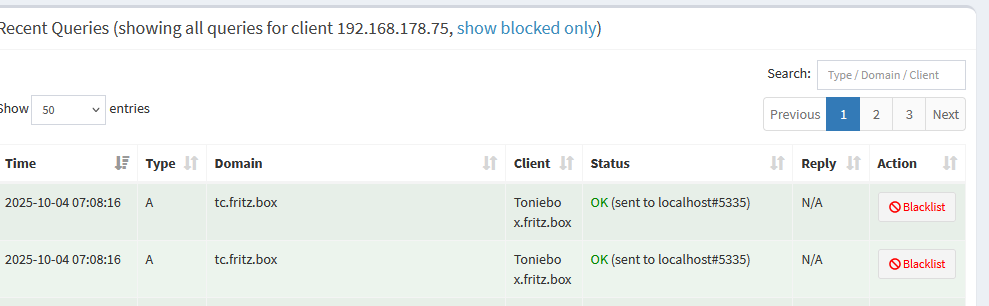
I assume I have some problem with my pi-hole. I can see this in it:

What do I have to change, to get that working? Why is the box still triing to connect to rtnl.bxcl.de and not to tc.fritz.box? And how can I do a ping test about the routing in altUrl.tc.fritz.box.json ?

Problem 2, Use of Hackiebox

Another thing I would try, is to generate all certificates again. But when I delete them, I have to bring at least the ca/c2 certificate to the box. I read this comment here and i have the strong feeling, that I am missing at least half of the topic “Hackiebox”.
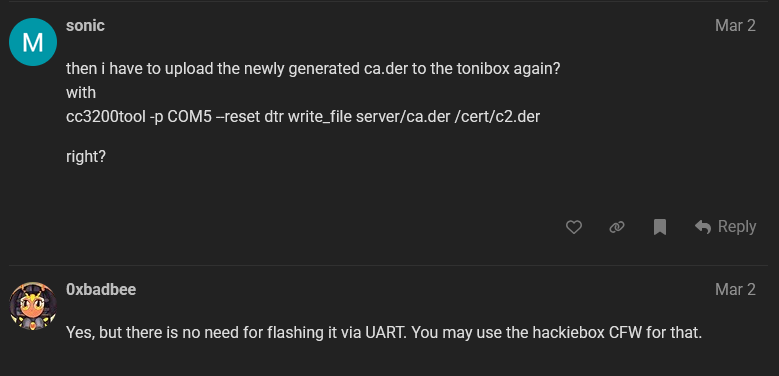
I downloaded hackiebox (hwbootloader), or what I think it is :wink: I have the “flash” and the “sd” folder, copied all the neccessary files as explanied in the CC3200 Setup Tutorial, but thats it.

What else is hackiebox? I read somehing about a webinterface, about changing ofw2 to cfw1… Where can I get more information about that? Or can someone quick explain?

Problem 3, firmware files

on the sd card in E:\revvox\boot are 3 files: ngbootloader.bin, ng-ofw1.bin, ngCfg.json and one folder. Is that correct? I am confused about the discription in the Tutorial at this point:

“Now the HackieboxNG bootloader will instantly boot the original bootloader and run the original firmware.” … Instantly at next boot of the Toniebox..? Just to be clear :wink:

“Note: The preloader will load any file placed to sd:/revvox/boot/ngbootloader.bin.” What? placed next to it, in the same folder? Or when you edit that file? Did I needed to edit it?

Thank you for helping newbies like me!

And thank you very much for this project!

Cheers

Jojo

Hi,

thanks for moving this to a new thread :slight_smile:

I found this gem:

And tried to follow that guide. In Section 4.3 the guide refers to “hackiebox_cfw”. I copied the /web and /audio folder to the sd card but failed to create my own cfw firmware, because I did not get this one: “In addition you need to install the cc3200 board library.”

Anyway, the readme of “hackiebox_cfw” says, it is outdated, and refers to “hackiebox_cfw_ng”. But here the looping links begin. The “How to build” in the firmware section refers to here:

then here:

And now i am in the bootloader wiki section and not in the firmware section… When I am searching in the wiki a can not find how to use/create a cfw or it brings me back to here: “hackiebox_cfw”.

I am lost :slight_smile:

Here some info that might help:

teddy bench log

INFO |tls_adapter.c:0204:read_certificate| File ‘/teddycloud/certs/server/ca-root.pem’ assumed PEM style
INFO |tls_adapter.c:0201:read_certificate| File ‘/teddycloud/certs/server/ca-key.pem’ detected as DER style RSA PRIVATE KEY
INFO |tls_adapter.c:0204:read_certificate| File ‘/teddycloud/certs/server/teddy-cert.pem’ assumed PEM style
INFO |tls_adapter.c:0201:read_certificate| File ‘/teddycloud/certs/server/teddy-key.pem’ detected as DER style RSA PRIVATE KEY
INFO |tls_adapter.c:0197:read_certificate| File ‘/teddycloud/certs/client/ca.der’ detected as DER style CERTIFICATE
INFO |tls_adapter.c:0197:read_certificate| File ‘/teddycloud/certs/client/client.der’ detected as DER style CERTIFICATE
INFO |tls_adapter.c:0201:read_certificate| File ‘/teddycloud/certs/client/private.der’ detected as DER style RSA PRIVATE KEY
INFO |toniesJson.c:0280:tonies_readJson| Trying to read /teddycloud/config/tonies.custom.json with size 2
INFO |toniesJson.c:0280:tonies_readJson| Trying to read /teddycloud/config/tonies.json with size 5668403
INFO |toniesJson.c:0100:tonies_update| Updating tonies.json from api.revvox.de
INFO |cloud_request.c:0200:web_request| Connecting to HTTP server api.revvox.de:443
INFO |cloud_request.c:0252:web_request| trying IP: 157.90.183.226
INFO |cloud_request.c:0389:web_request| Redirecting to: https://raw.githubusercontent.com/toniebox-reverse-engineering/tonies-json/release/tonies.json
INFO |cloud_request.c:0200:web_request| Connecting to HTTP server raw.githubusercontent.com:443
INFO |cloud_request.c:0252:web_request| trying IP: 185.199.110.133
INFO |toniesJson.c:0124:tonies_update| … success updating tonies.json from api.revvox.de, reloading
INFO |toniesJson.c:0280:tonies_readJson| Trying to read /teddycloud/config/tonies.custom.json with size 2
INFO |toniesJson.c:0280:tonies_readJson| Trying to read /teddycloud/config/tonies.json with size 5668403
INFO |toniesJson.c:0211:tonieboxes_update| Updating tonies.json from api.revvox.de
INFO |cloud_request.c:0200:web_request| Connecting to HTTP server api.revvox.de:443
INFO |cloud_request.c:0252:web_request| trying IP: 157.90.183.226
INFO |cloud_request.c:0389:web_request| Redirecting to: https://raw.githubusercontent.com/toniebox-reverse-engineering/tonies-json/release/tonieboxes.json
INFO |cloud_request.c:0200:web_request| Connecting to HTTP server raw.githubusercontent.com:443
INFO |cloud_request.c:0252:web_request| trying IP: 185.199.109.133
INFO |toniesJson.c:0238:tonieboxes_update| … success updating tonieboxes.json from api.revvox.de, reloading
INFO |toniesJson.c:0280:tonies_readJson| Trying to read /teddycloud/config/tonies.custom.json with size 2
INFO |toniesJson.c:0280:tonies_readJson| Trying to read /teddycloud/config/tonies.json with size 5668403
INFO |server.c:0931:server_init| 1 open HTTPS Web connections
INFO |handler_api.c:0501:handleApiSettingsSet| Setting: ‘cloud.enableV1Time’ to ‘true’
INFO |settings.c:0860:settings_load_ovl| Load settings from /teddycloud/config/config.overlay.ini
INFO |handler_api.c:0407:handleApiTrigger| Triggered WriteConfig
INFO |settings.c:0756:settings_save_ovl| Save settings to /teddycloud/config/config.ini
INFO |settings.c:0756:settings_save_ovl| Save settings to /teddycloud/config/config.overlay.ini
INFO |settings.c:1521:settings_loop| Settings file changed. Reloading.
INFO |settings.c:0860:settings_load_ovl| Load settings from /teddycloud/config/config.ini
INFO |tls_adapter.c:0204:read_certificate| File ‘/teddycloud/certs/server/ca-root.pem’ assumed PEM style
INFO |tls_adapter.c:0201:read_certificate| File ‘/teddycloud/certs/server/ca-key.pem’ detected as DER style RSA PRIVATE KEY
INFO |tls_adapter.c:0204:read_certificate| File ‘/teddycloud/certs/server/teddy-cert.pem’ assumed PEM style
INFO |tls_adapter.c:0201:read_certificate| File ‘/teddycloud/certs/server/teddy-key.pem’ detected as DER style RSA PRIVATE KEY
INFO |tls_adapter.c:0197:read_certificate| File ‘/teddycloud/certs/client/ca.der’ detected as DER style CERTIFICATE
INFO |tls_adapter.c:0197:read_certificate| File ‘/teddycloud/certs/client/client.der’ detected as DER style CERTIFICATE
INFO |tls_adapter.c:0201:read_certificate| File ‘/teddycloud/certs/client/private.der’ detected as DER style RSA PRIVATE KEY
INFO |settings.c:0860:settings_load_ovl| Load settings from /teddycloud/config/config.overlay.ini
INFO |handler_cloud.c:0041:handleCloudTime| >> respond with current time
INFO |mqtt.c:0690:mqtt_init_box| Skipping client ‘Toniebox’ (cn: ‘default’)
INFO |cloud_request.c:0200:web_request| Connecting to HTTP server prod.de.tbs.toys:443…
INFO |cloud_request.c:0252:web_request| trying IP: 3.69.182.181
INFO |cloud_request.c:0486:web_request| Response: ‘1759379360’
INFO |server.c:0931:server_init| 0 open HTTPS Web connections
INFO |server.c:0931:server_init| 1 open HTTPS Web connections
INFO |server.c:0931:server_init| 3 open HTTPS Web connections
INFO |handler_api.c:2389:handleApiTonieboxJson| Trying to read /teddycloud/config/tonieboxes.json with size 3022
INFO |server.c:0931:server_init| 5 open HTTPS Web connections
INFO |server.c:0931:server_init| 3 open HTTPS Web connections
INFO |server.c:0931:server_init| 6 open HTTPS Web connections
INFO |server.c:0931:server_init| 2 open HTTPS Web connections
INFO |server.c:0931:server_init| 0 open HTTPS Web connections
INFO |server.c:0931:server_init| 1 open HTTPS Web connections
INFO |server.c:0931:server_init| 0 open HTTPS Web connections
INFO |server.c:0931:server_init| 1 open HTTPS Web connections
INFO |server.c:0931:server_init| 0 open HTTPS Web connections
INFO |server.c:0931:server_init| 1 open HTTPS Web connections
INFO |server.c:0931:server_init| 0 open HTTPS Web connections
INFO |server.c:0931:server_init| 1 open HTTPS Web connections
INFO |handler_api.c:2389:handleApiTonieboxJson| Trying to read /teddycloud/config/tonieboxes.json with size 3022
INFO |server.c:0931:server_init| 3 open HTTPS Web connections
INFO |server.c:0931:server_init| 6 open HTTPS Web connections
INFO |handler_api.c:2389:handleApiTonieboxJson| Trying to read /teddycloud/config/tonieboxes.json with size 3022
INFO |server.c:0931:server_init| 4 open HTTPS Web connections
INFO |server.c:0931:server_init| 3 open HTTPS Web connections
INFO |server.c:0931:server_init| 6 open HTTPS Web connections
INFO |server.c:0931:server_init| 4 open HTTPS Web connections
INFO |server.c:0931:server_init| 2 open HTTPS Web connections
INFO |server.c:0931:server_init| 1 open HTTPS Web connections
INFO |server.c:0931:server_init| 0 open HTTPS Web connections
INFO |server.c:0931:server_init| 1 open HTTPS Web connections
INFO |server.c:0931:server_init| 2 open HTTPS Web connections
INFO |server.c:0931:server_init| 0 open HTTPS Web connections
INFO |server.c:0931:server_init| 6 open HTTPS Web connections
INFO |handler_cloud.c:0041:handleCloudTime| >> respond with current time
INFO |mqtt.c:0690:mqtt_init_box| Skipping client ‘Toniebox’ (cn: ‘default’)
INFO |cloud_request.c:0200:web_request| Connecting to HTTP server prod.de.tbs.toys:443…
INFO |cloud_request.c:0252:web_request| trying IP: 3.74.99.150
INFO |handler_cloud.c:0041:handleCloudTime| >> respond with current time
INFO |mqtt.c:0690:mqtt_init_box| Skipping client ‘Toniebox’ (cn: ‘default’)
INFO |cloud_request.c:0200:web_request| Connecting to HTTP server prod.de.tbs.toys:443…
INFO |cloud_request.c:0252:web_request| trying IP: 3.74.99.150
INFO |cloud_request.c:0486:web_request| Response: ‘1759487773’
INFO |cloud_request.c:0200:web_request| Connecting to HTTP server prod.de.tbs.toys:443…
INFO |cloud_request.c:0252:web_request| trying IP: 3.74.99.150
INFO |cloud_request.c:0200:web_request| Connecting to HTTP server prod.de.tbs.toys:443…
INFO |cloud_request.c:0252:web_request| trying IP: 3.74.99.150
INFO |cloud_request.c:0486:web_request| Response: ‘1759487774’
INFO |server.c:0931:server_init| 5 open HTTPS Web connections
INFO |server.c:0931:server_init| 2 open HTTPS Web connections
INFO |server.c:0931:server_init| 0 open HTTPS Web connections
INFO |server.c:0931:server_init| 1 open HTTPS Web connections
INFO |server.c:0931:server_init| 0 open HTTPS Web connections

ngCfg.json

{
“general”: {
“activeImg”: “ofw2”,
“_descWaitForPress”: “Waits for an earpress on startup”,
“waitForPress”: false,
“_descWaitForBoot”: “Waits for an earpress before firmware boot”,
“waitForBoot”: false,
“waitTimeoutInS”: 60,
“_descMinBatteryLevel”: “Divide through 2785 to get voltage”,
“minBatteryLevel”: 8869,
“ofwFixFlash”: “/sys/pre-img.bin”,
“_descSerialLog”: “Logging only works with the debug build!”,
“serialLog”: false,
“_descLogLevel”: “0:Trace - 5:Fatal”,
“logLevel”: 0,
“_descLogColor”: “Use colors in log output”,
“logColor”: false
},
“ofw1”: {
“checkHash”: false,
“hashFile”: false,
“watchdog”: true,
“bootFlashImg”: true,
“flashImg”: “/sys/pre-img.bin”
},
“ofw2”: {
“checkHash”: true,
“hashFile”: false,
“watchdog”: true,
“ofwFix”: true,
“ofwSimBL”: true,
“patches”: [“altCa.305”, “altUrl.tc.fritz.box”]
},
“ofw3”: {
“checkHash”: true,
“hashFile”: false,
“watchdog”: true,
“ofwFix”: true,
“patches”: [“altCa.305”, “altUrl.tc.fritz.box”]
},
“cfw1”: {
“checkHash”: false,
“hashFile”: false,
“watchdog”: true
},
“cfw2”: {
“checkHash”: false,
“hashFile”: false,
“watchdog”: true
},
“cfw3”: {
“checkHash”: false,
“hashFile”: false,
“watchdog”: true
},
“add1”: {
“checkHash”: true,
“hashFile”: false,
“watchdog”: true,
“ofwFix”: true,
“ofwSimBL”: false,
“patches”: [“blockCheck.310”, “noCerts.305”, “noPass3.310”, “noPrivacy.305”, “uidCheck.307”]
},
“add2”: {
“checkHash”: true,
“hashFile”: false,
“watchdog”: true,
“ofwFix”: true,
“ofwSimBL”: false,
“patches”: [“altCa.305”, “altUrl.305”]
},
“add3”: {
“checkHash”: true,
“hashFile”: false,
“watchdog”: true,
“ofwFix”: true,
“ofwSimBL”: false,
“patches”: [“altCa.305”, “altUrl.305”]
}
}

Cheers

Jojo

PS:
I added this here in my pihole, now it seems to work:

Installing cfw just means placing the cfw….bin file on the boxes sd card? Please read the documentation carefully.

But why do you want to install cfw? For running toniebox with teddycloud ofw2 with altca and alturl patch is sufficient
Only reason for cfw in this context is easy changing the ca.der.

Hi, henryk, thanks for your quick reply!

installing cfw… placing the cfw…bin file

If I understood correctly, I have to create that file by myself. Either with
A) With the outdated “hackiebox_cfw”,
but there I struggle with “In addition you need to install the cc3200 board library” in ernergia
B) With the “hackiebox_cfw_ng”
But here I have no clue at all. I hesitate to run the mentioned buildAndShip.bootloader.sh script, without knowing what will be the outcome. Is that the correct path to create a cfw.bin?

I wanted to try the cfw, to be able to get new certificates on the box (maybe they are broken in the first place), without the UART again.

I really tried to read alle the documents, but I click three/four links and then I am back at the page, where I started…

I tried it with ofw2, but somehow it is not working. I get codeword ant after the freshness check, the teddycloud does not find a toniebox, and when I interpret the entrys in pihole correctly, the toniebox is still triing to connect to boxine and not to tc.fritz.box

Cheers

Jojo

No, you can download the release package and copy it unzipped on the sd card.

You might post the cfg.json
If it’s not connecting to the right ip/host, in most cases something here is wrong.

Hi,

can you please be so kind and show me, where I can download it? And what should I download? I clicked to several folders/structures in GitHub… And what documentation am I missing, that I can not find a discription of that?

I already postet the cfg.json above, but here we go again:

ngCfg.json

{
“general”: {
“activeImg”: “ofw2”,
“_descWaitForPress”: “Waits for an earpress on startup”,
“waitForPress”: false,
“_descWaitForBoot”: “Waits for an earpress before firmware boot”,
“waitForBoot”: false,
“waitTimeoutInS”: 60,
“_descMinBatteryLevel”: “Divide through 2785 to get voltage”,
“minBatteryLevel”: 8869,
“ofwFixFlash”: “/sys/pre-img.bin”,
“_descSerialLog”: “Logging only works with the debug build!”,
“serialLog”: false,
“_descLogLevel”: “0:Trace - 5:Fatal”,
“logLevel”: 0,
“_descLogColor”: “Use colors in log output”,
“logColor”: false
},
“ofw1”: {
“checkHash”: false,
“hashFile”: false,
“watchdog”: true,
“bootFlashImg”: true,
“flashImg”: “/sys/pre-img.bin”
},
“ofw2”: {
“checkHash”: true,
“hashFile”: false,
“watchdog”: true,
“ofwFix”: true,
“ofwSimBL”: true,
“patches”: [“altCa.305”, “altUrl.tc.fritz.box”]
},
“ofw3”: {
“checkHash”: true,
“hashFile”: false,
“watchdog”: true,
“ofwFix”: true,
“patches”: [“altCa.305”, “altUrl.tc.fritz.box”]
},
“cfw1”: {
“checkHash”: false,
“hashFile”: false,
“watchdog”: true
},
“cfw2”: {
“checkHash”: false,
“hashFile”: false,
“watchdog”: true
},
“cfw3”: {
“checkHash”: false,
“hashFile”: false,
“watchdog”: true
},
“add1”: {
“checkHash”: true,
“hashFile”: false,
“watchdog”: true,
“ofwFix”: true,
“ofwSimBL”: false,
“patches”: [“blockCheck.310”, “noCerts.305”, “noPass3.310”, “noPrivacy.305”, “uidCheck.307”]
},
“add2”: {
“checkHash”: true,
“hashFile”: false,
“watchdog”: true,
“ofwFix”: true,
“ofwSimBL”: false,
“patches”: [“altCa.305”, “altUrl.305”]
},
“add3”: {
“checkHash”: true,
“hashFile”: false,
“watchdog”: true,
“ofwFix”: true,
“ofwSimBL”: false,
“patches”: [“altCa.305”, “altUrl.305”]
}
}

Thank you very much for your help!

Cheers

Jojo

The cfg.json looks fine.

Here you can find the download: Releases · toniebox-reverse-engineering/hackiebox_cfw · GitHub

Download it, unzip it and copy it onto the sd card ( iirc in the revvox folder. The bin file should be in the same folder as the ofw…bin)

—> Bootloader | Toniebox Hacking

Hi,

thanks a lot!
That helped me. I was lost in the jungle of different versions of the cfw…

I successfully installed the cfw and got used to switching between different firmwares (ofw1, ofw2, cfw1). I recreated the server certificates (but now my connection to boxine is red…) and copied the ca/c2 again to the flash.

I started ofw2, but now I get codeword owl (before it was ant).

Then I noticed that in the Tutorial in the teddycloud and the wiki here: Installation | Toniebox Hacking in section 1.2.4.2 “Copy over preloader” are different screenshots of which file should be copied to flash/sys/mcuimg.bin.
Tutorial in teddycloud uses “mcuimg.bin” to upload (located in the download here: flash/sys)
And the wiki says “ngpreloader.bin” (located in the download here: sd/revoxx/boot)

Anyway, I tried both, still codeword owl.

I guess that the altUrl.tc.fritz.box path is not used, because I can see on pihole, that the toniebox still tries to connect to rtnl.bxcl.de, even with my local DNS entry in pihole set to the IP of the teddycloud.

Is there a way to use the console of the cfw to ping or see which IP it uses?

I will try to shutdown the pihole and see if I can get it to work.

Cheers

Jojo

If you can switch between the different firmwares, than everything regards the preloaded is fine .

Please ensure ofw2 with both patches is running. Then it should try to reach tc.fritz.box

(Did you test tc.fritz.box?)

It works!!!

What do you mean with test tc.fritz.box? When I enter “tc.fritz.box” in my browser, i come to the teddycloud.

The problem was with pihole.
Pihole is used as the upstream DNS server of the fritzbox AND is the DNS Server of all clients in my network. Pihole redirection via DNS entrys can not go to tc.fritz.box, it can only go to the IP (which is longer than 12 characters)

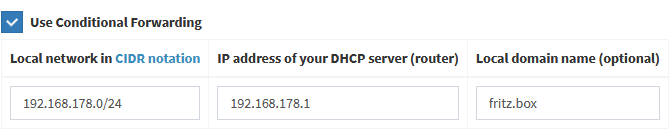
The problem was this here:

Pihole→Settings→DNS→conditional forewarding

Before the local domain name was “local”. After changing it to fritz.box it worked.

Thank you very much for your help!!!

Can you change the title of the topic to “Problems getting cc3200 running with TC and pihole” so maybe this helps other people.

I will start playing with the teddycloud now :slight_smile: Thanks a lot!

Any idea, why the connection to boxine is not working?
Edit: Yes! Because of my tests with the Local DNS Records…

Cheers

Jojo