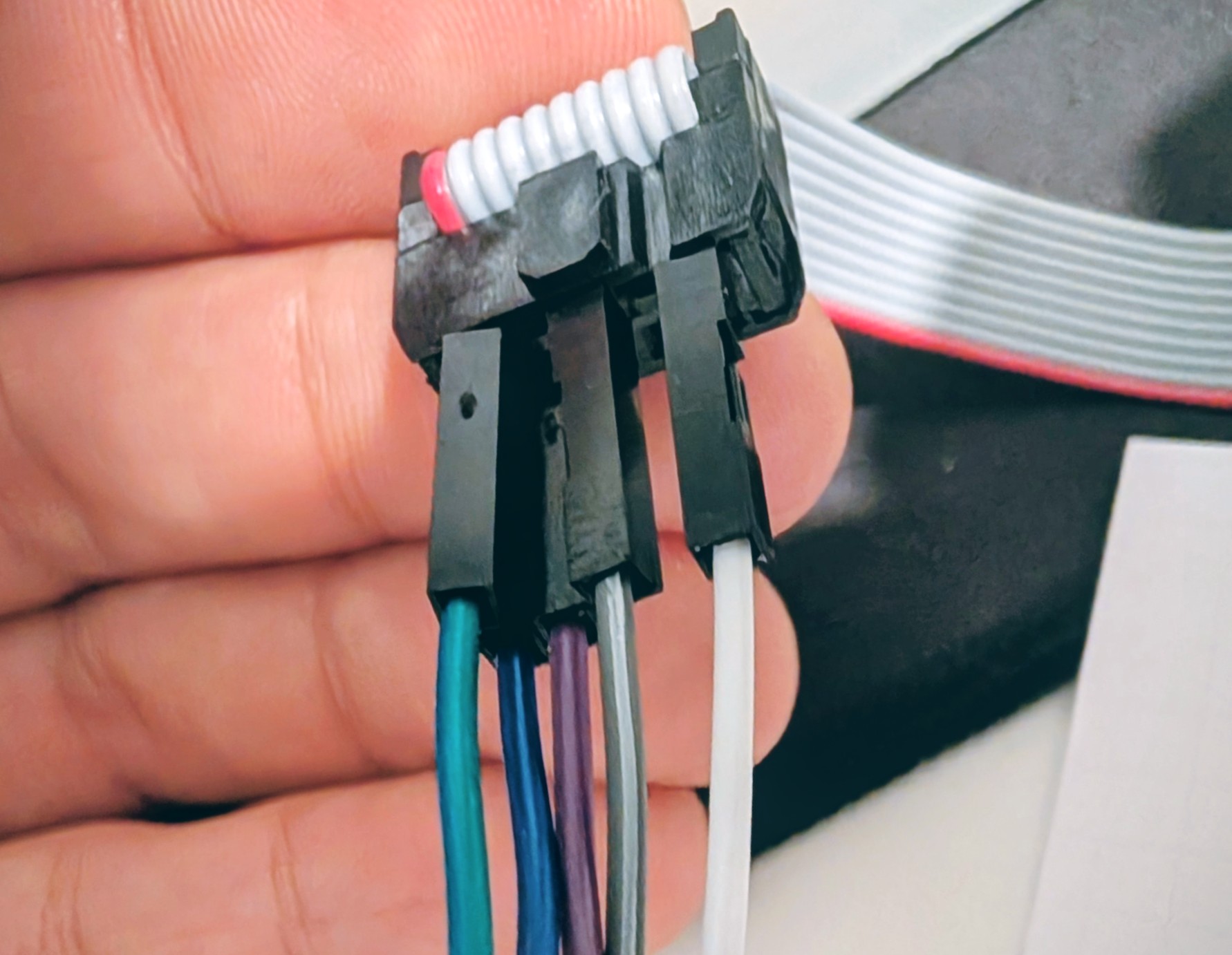
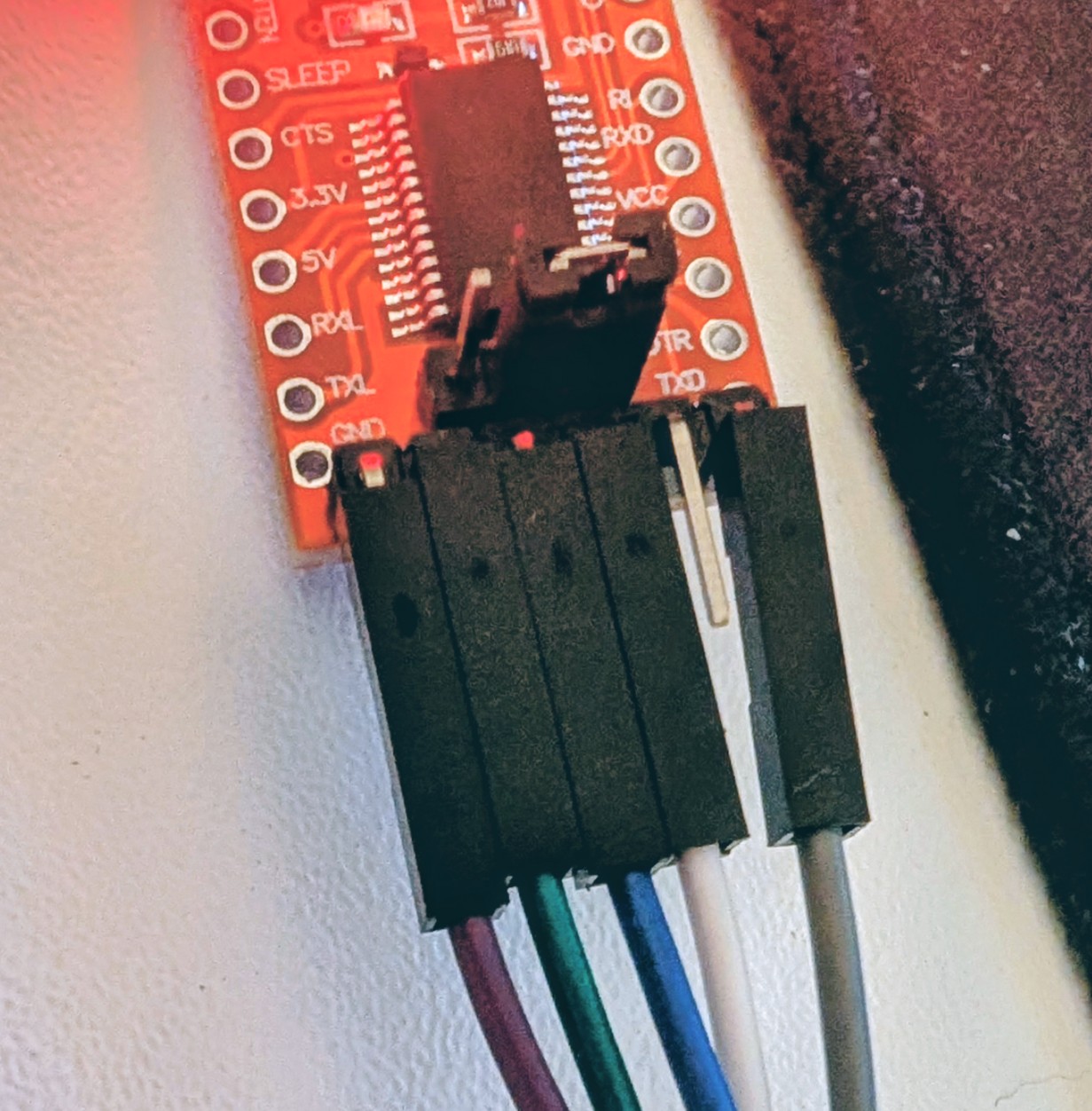
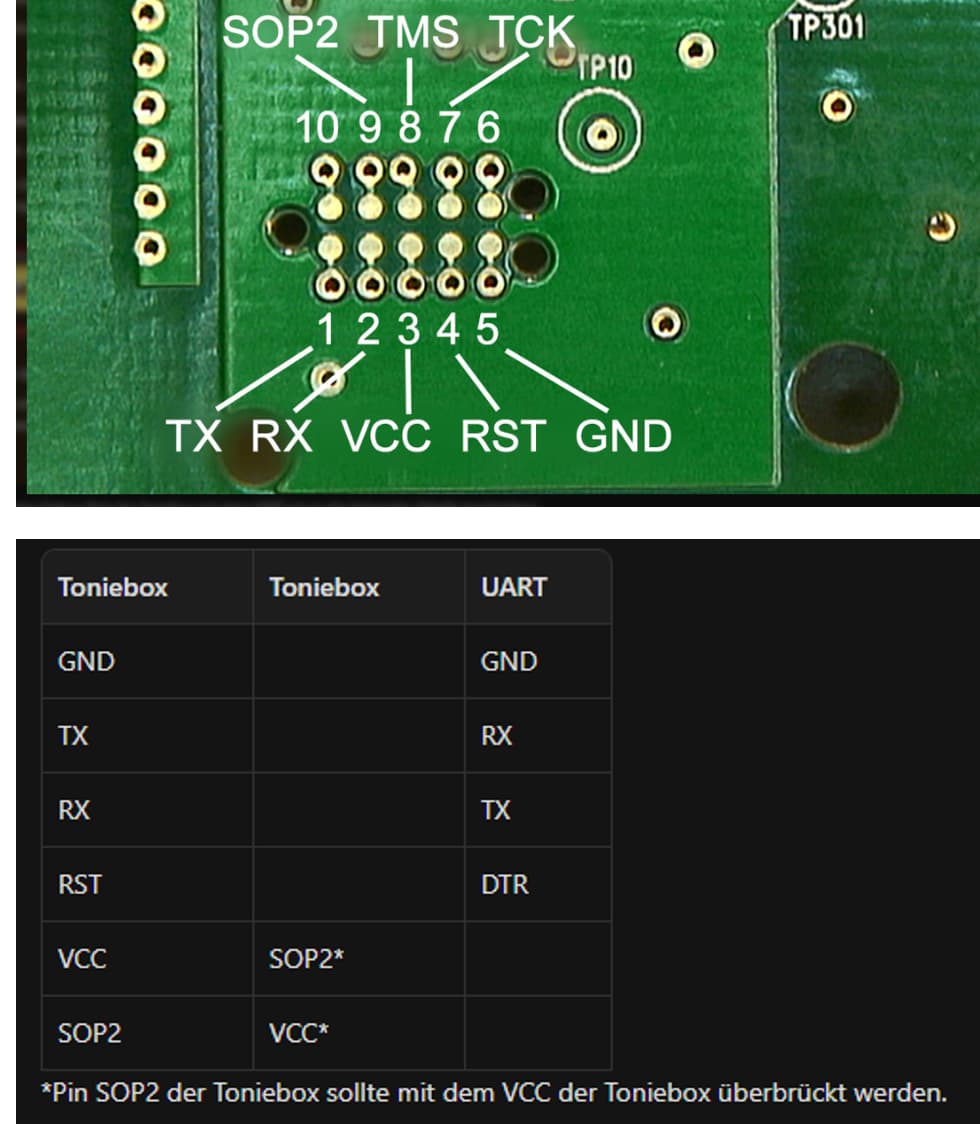
Timed out while waiting for ack

Hi folks,

exactly the same error here:

  • The target is a C3200 box
  • I’m using Windows 11, Python 3.13.3
  • I tried two different UART / USB-C adapters (actually three different adapter boards, two from one type and one from another), but no luck. They are both FTDI232 (FT32RL), configured to use 3.3V for sure.
  • Cables are kept short (< 25cm) and are soldered directly to the PCB of the TonieBox. Connections were verified using a mulimeter.
  • Connections between the FTDI232 adapter and the TonieBox debug port are as shown in Debug port | Toniebox Hacking

Output:

D:\TonieBox>cc3200tool -p COM7 --reset dtr read_flash ExtractedFromBox/backup.bin
2025-06-03 00:00:30,012 -- Connecting to target...
2025-06-03 00:00:32,214 -- timed out while waiting for ack
2025-06-03 00:00:34,428 -- timed out while waiting for ack
2025-06-03 00:00:36,633 -- timed out while waiting for ack
2025-06-03 00:00:38,845 -- timed out while waiting for ack
2025-06-03 00:00:41,060 -- timed out while waiting for ack
2025-06-03 00:00:41,061 -- Could not connect to target: Did not get ACK on break condition

I did not only try different UART adapters, but also different reset methods:

  • Reset via --reset dtr
  • Manual reset by connecting RST to GND
  • Different reset timings (in relation to the power-up and the command execution

I did also try different methods to pull the SOP2 high:

  • bridging SOP2 to VCC of the TonieBox
  • connecting SOP2 to RTS and adding --sop2 ~rts
  • connecting SOP2 to VCC of the UART adapter

The SOP2 voltage was measured with a simple multimeter and it was 3.25V.

I tried with the battery and with the power supply. Both lead to the same effect.

In general, I apply the following sequence:

  • Connect UART adapter to TonieBox
  • Connect USB-C of the UART adapter to the PC
  • Connect power (battery or power supply) → TonieBox LED goes to permanent green
  • Execute command → RX LED of the UART adapter lights up for maybe 0.5s and then goes off again

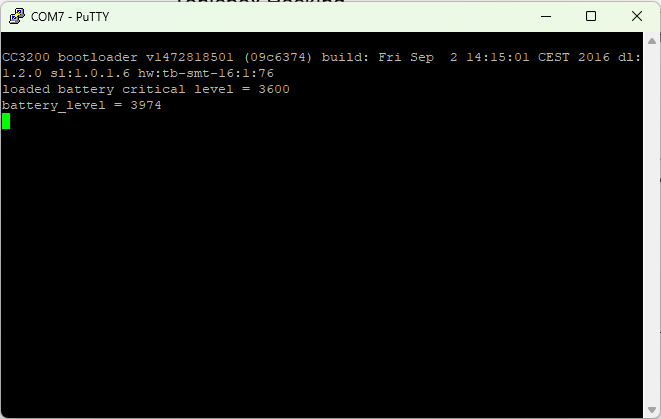
I did also try without pulling SOP2 high with Putty and a Baudrate of 921600. I received the following from the bootloader:
Any idea what else I could try or what I’m doing wrong? I even ordered a second TonieBox today to see if it’s me or the box… Hahaha :smiley:

Thanks and best wishes,
Sebastian

Are both uarts usb-c ones? Those seems to be problematic.

Yes, they are. Not sure if it’s allowed to post links to the product page here, but they are both rated very well on the largest American marketplace platform starting with “A”. But I guess in the end, they are all from China.

Should I get e.g. a Micro-USB one?

I bought this one and it worked fine:

AZDelivery Kompatibel mit FT232RL… Amazon.de

Hi

I got yours as Usb-C version and it’s linked with usbC->UsbA with logi or OnePlus data cabel and on my Laptop with usbC->UsbC ocetea or Samsung data cabel.
Direkt on Front or Mainbord Panel.

As said. Usb-c version cause problems. Get a micro usb version.

Thanks for the fast reply, I ordered the one you have now. Let’s see if that solves the problem. The other two models I tried previously (the USB-C ones) are those:

Once confirmed that USB-C is the issue, maybe one should add a big red warning to the wiki not to buy USB-C adapters.

I will let you know, if it worked, once the new adapter arrived.

Thanks so far.

Yeah thx the problem was realy only Usb-C .

Hi, same here.

The recommended adapter arrived, connected as before, worked like a charm at first try.

Again, thanks a lot @henryk

I added the hint in the Wiki and in teddycloud itself, will be available after it is merged.

1 Like

Hi there,

I’m new to this project and I’d like to flash my CC3200 based toniebox as well.

I have a FTDI 1145-C FT232RL Flash adaptor (mini-usb) on my own which I wired to a TC2050 plug

This is my wiring. Without power supply or battery, the onboard LED of Toniebox remains in red steady state

USB UART <-> Toniebox CC3200
----------------------------
DTR -> Green	-> RST Pin
Rx 	-> Red		-> Tx Pin
Tx 	-> Yellow	-> Rx Pin
GND -> Orange	-> GND
	   Black	-> SOP2 
	   Black 	-> VCC


I also tried it with power-supply enabled (both, battery and power supply). But then the LED turns green flashing (boot-sequence, and remains green afterwards (normal operation mode). So flashing was also not possible. In each situation, I faced the following issue:

PS C:\Users\julian\Desktop\Toniebox> cc3200tool -p COM4 --reset dtr read_all_files targetdir/ read_flash backup.bin
2025-12-28 11:57:29,820 -- Connecting to target...
2025-12-28 11:57:32,135 -- timed out while waiting for ack
2025-12-28 11:57:34,358 -- timed out while waiting for ack
2025-12-28 11:57:36,582 -- timed out while waiting for ack
2025-12-28 11:57:38,805 -- timed out while waiting for ack
2025-12-28 11:57:41,033 -- timed out while waiting for ack
2025-12-28 11:57:41,038 -- Could not connect to target: Did not get ACK on break condition

Any suggestions, what else need to be checked?

Hi @julianpe,

I believe, I fixed your problem, by connecting the SOP2 of the Toniebox with the VCC of the UART adapter.

Dear Revoxx Team.

Nevertheless, I do not get much further. I tried in Windows 10 and Windows 11.

  1. I installed the older drivers 2.12.28 (but also tried with 2.12.36.20)
  2. I changed the baud rate to 115200
  3. I changed the latency to 1ms
  4. I plugged in the battery, Toniebox blinks three times, goes blue and then goes green and stays green the entire time, even when I connect the TC2050 (I connected it twice in the past with I believe wrong wiring (TC2050 upside down, then the light turned either orange, yellow or red, if I remember correctly)
  5. I then entered the following command and received the following two response, sometimes even waiting 30seconds or more than a minute for the responses:

C:\Users\tiama\tonies>cc3200tool -p COM5 --reset dtr read_all_files ExtractedFromBox/
2026-01-16 22:02:22,860 – Connecting to target…
2026-01-16 22:02:25,815 – Connected, reading version…
2026-01-16 22:02:53,338 – Could not connect to target: rx csum failed

Or:

C:\Users\tiama\tonies>cc3200tool -p COM5 --reset dtr read_all_files ExtractedFromBox/
2026-01-16 22:14:50,774 – Connecting to target…
2026-01-16 22:15:17,966 – Connected, reading version…
2026-01-16 22:15:27,700 – Could not connect to target: did not get entire response

So something is going on. SD card is installed, battery is connected and the light is green and stays green, when I connect the TC2050.

Could someone please help? I disassembled my son’s Toniebox one week ago and he is already asking about it, so I really want to finish this job this weekend.

On another note, the TC2050 has this push spring pins. I always hold the TC2050 down with my fingers to the board, or are you using clips / holders to keep it attached to the board?

Any help would be greatly appreciated.

I tried to add some pictures matching @henryk pictures, except for the SOP2 / VCC connection. But as I am new in this forum, I was not allowed to upload pictures. When I do it exactly as in the pictures by @henryk I also get the message: “timed out while waiting for ack”.

Thank you,

Seabass

Hi Henryk,

I’m confused. Your link leads to a Mini-USB UART adapter. Down below, you write to get a Micro-USB adapter. Which one is correct? I have already bought two adapters from AZ-Delivery (Mini-USB-B, FT232RL w/ DTR & USB-A, CH340G w/o DTR). I tested the latter first and was able to establish a connection with my C3200, however, the data extraction/backup was not successful. I performed the manual RST-to-ground reset before sending commands. Generated files were always empty. I blamed it on the adapter and got the other one from your link. Now this particular one doesn’t even establish a connection with the box. I always get “timed out while waiting for ack“. My wiring should be correct, and the connections have been checked via a multimeter. Of course, the adapter is set to 3.3 V. I tested two different mini USB cables and kept the jumper cables connected to the board short < 10 cm. I am beginning to get stressed out, and the kid is breathing down my neck :wink: Any ideas?

Maybe I mixed up mini and Micro, but I did use the linked one. And it worked fine for me.

Does anybody have an idea what else I could try? I don’t want to buy every UART adapter on the market. :wink: I’m pretty sure that the wiring was correct, Tonibox was powered, and the green light was constantly on. Is there anything I could have missed? Do I need to connect SOP2 to VCC after powering the board up? What is the right order of UART connection to the board and the computer in relation to powering the board? Let me know if you need any more infos!

@henryk I use your wiring and also the correct UART adapter from your link. I also tried what @Yondu1337 tried as described in the posts before. I also sadly only always get:

timed out while waiting for ack

Any hints? Could it be that something changed? Its seems to be not working anymore. Thx

Can you post the command? Did you try manual reset ?

I wired it according to the Teddy Cloud expanations:

VCC and SOP2 were always connected. Do I need this to be disconnected at any point, e.g., before power up, if I retry anything, etc.?

I use the following command:

cc3200tool -p COM4 --reset dtr read_all_files ExtractedFromBox/ read_flash backup.bin

I haven’t tried the manual reset yet, but I can give it another go Monday night.

I am running Win11 and tested two driver versions of the UART adapter.

As already mentioned, I will give it another go tomorrow night. I’m thankful for any tips or recommendations on what to try out.

Cheers,

Yondu1337

I am also interested in your outcome in monday.

I use the same command (only another com port).

Also haven’t performed a Manual reset yet. How To-Do it correctly? briefly connect RTS to GND before each command?

In General, in which Order should all the steps be performed?

Thx

Good morning, everyone!

So, after a bad start, last night actually turned out to be a success.

  1. I connected the mini-USB-B UART adapter to the board of the box. I left DTR/RST disconnected.
  2. I powered the board up via the charger (green light on), then plugged the USB cable into my Notebook.
  3. I connected RST to ground by briefly (~1 s) brushing over RST and GND on the board with a piece of stranded wire –> an LED on the UART should light up!
  4. I executed the command

cc3200tool -p COM4 read_all_files ExtractedFromBox/ read_flash backup.bin

  1. I get the error:

timed out while waiting for ack

Could not connect to target: Did not get ACK on break condition

  1. I tried several times, checked the connection again, and so forth, and also split the command in two as suggested –> NO success
  2. Since everything was already connected, I powered down everything and connected the other UART adapter with USB-A
  3. Powered back up, connected the adapter, and tried again, and - voila - it seemed to work!
  4. I needed to try a few times to get the backup.bin, and I think splitting the commands helped here, so what I did was:
    1. Briefly connect RST and GND
    2. Run: cc3200tool -p COM5 read_all_files ExtractedFromBox/
    3. Briefly connect RST and GND, again
    4. Run: cc3200tool -p COM5 read_flash backup.bin
  5. As already mentioned, for some reason, the backup.bin was a little harder to extract, but after a handful of tries, I had the 4096 kB of data
  6. Finally, I followed the TeddyCloud instructions to the letter, making sure to briefly connect RST and GND between commands, and the rest worked like a charm.

I have all our Tonies on the TeddyCloud now and linked the Disney’s Robin Hood audio book (backed up from Audible) to one of our creative Tonies to test the new capabilities. I also ordered some NFC-Tags from RFID-Friend just 10 min ago - now the fun is about to start :wink:

Sadly, I couldn’t figure out what the problem with the mini-USB adapter is. The only thing I can think of is that it somehow arrived broken, or that my USB cable is too long/broken. I don’t have any other mini-USB-B cables lying around, so I couldn’t test this hypothesis.

Cheers,

Yondu1337